
Candidate Rejection Email After an Interview : Template & Tips

Leverage your Interview Data
AI interview notes, scorecard, follow-up, ATS integration, and more...
.svg)
.svg)
There's one task that many recruiters dread : sending rejection emails.
It's tempting to skip this step, but failing to do so can damage your company's reputation and leave candidates with a negative impression.
This article will show you how to craft them effectively -with templates provided.
Why Always Send Personalized Rejection Emails
Sending personalized rejection emails after interviews takes time, but is worth it the long run for your company :
Maintaining a Positive Employer Brand
Personalized rejection emails show candidates that you value their time and effort. This can lead to positive word-of-mouth about your company. When candidates receive a personalized rejection email, they are more likely to speak positively about their experience, even if they didn't get the job.
On the other hand, if you fail to communicate effectively, candidates might leave negative reviews online. Especially when six out of ten candidates are likely to share their negative experiences with others.
Improving Candidate Experience
Candidates invest considerable time and effort in preparing for interviews. They deserve to know the outcome of their application. By sending personalized rejection emails, you show that you value their effort and respect their time.
A survey by Career Sidekick found that candidates appreciate receiving feedback and closure after an interview.
Keeping a Wide Talent Pool
Today's rejected candidates might be tomorrow's perfect fit. A personalized rejection email helps keep the door open for future opportunities.
Candidates who feel respected and valued are more likely to reapply for future openings and recommend your company to others.
What Makes a Thoughtful Rejection Email?

Here's what you should include to make your rejection emails effective and considerate.
Personalization
Always personalize your rejection emails. Address the candidate by name and mention specific details from their interview. This shows that you paid attention and valued their time. Personalization can make the rejection feel less generic and more respectful.
For example, instead of starting with a bland "Dear Candidate," use "Dear [Candidate’s Name]," and refer to specific points discussed during the interview. This approach makes your communication feel more genuine and considerate.
Timeliness
Send your rejection email promptly. Once you have made your decision, don’t delay informing the candidates.
Delayed responses can leave candidates feeling anxious and neglected. Aim to send the rejection email within a few days after the decision is made.
Constructive Feedback
Whenever possible, provide constructive feedback. This is one of the most valuable aspects of a rejection email. It helps candidates understand where they can improve and shows that you care about their professional growth.
Be specific about areas where they did well and where they can improve. For instance, if a candidate lacked experience in a particular area, mention it and suggest ways they can gain that experience. Constructive feedback not only helps candidates but also enhances your company's reputation as a supportive employer.
Professional and Polite Tone
Maintain a professional and polite tone throughout the email.
Thank the candidate for their time and effort. Express gratitude for their interest in the position and your company.
A simple "Thank you for taking the time to interview with us" can go a long way in softening the impact of the rejection.
Offer Future Opportunities
Encourage candidates to apply for future positions. Let them know that, although they were not selected for this role, you were impressed with their qualifications and would like to consider them for future openings.
This keeps the door open for future engagement and leaves the candidate with a positive impression.
Templates of Rejection Emails

Below are six templates tailored to different situations — from simple closures to more personalized messages that leave the door open for future opportunities :
✅ Template 1 — Simple Post-Interview Rejection Email
When to use it: Candidate interviewed but isn’t moving forward.
Subject: Thank you for interviewing with [Company Name]
Hello [Candidate Name],
Thank you for taking the time to interview for the [Job Title] position at [Company Name]. We really appreciated the opportunity to learn more about your background and experience.
After careful consideration, we have decided to move forward with another candidate whose experience more closely aligns with our current needs. This decision was not easy, as we met several strong candidates, including you.
We sincerely appreciate your interest in our company and the effort you invested in the process. We wish you every success in your job search and future career.
Kind regards,
[Your Name]
[Your Position]
[Company Name]
✅ Template 2 — Encouraging Post-Interview Rejection (Keep Door Open)
When to use it: Candidate wasn’t selected, but you’d like them in your talent pool.
Subject: Update on your application — [Company Name]
Hi [Candidate Name],
Thank you very much for your time and energy throughout our interview process for the [Job Title] role at [Company Name]. We truly enjoyed speaking with you and learning more about what you could bring to the team.
While we’ve chosen to move forward with another candidate for this position, we were impressed by your skills and background. We would welcome you to apply again for future opportunities that may better align with your strengths.
Thank you again for your interest in our organization, and we wish you the very best moving forward.
Best regards,
[Your Name]
[Your Position]
[Company Name]
✅ Template 3 — Detailed Rejection with Constructive Feedback
When to use it: You want to give the candidate helpful takeaways without over-explaining.
Subject: Feedback on your interview for [Job Title]
Hello [Candidate Name],
Thank you again for interviewing with us for the [Job Title] position at [Company Name]. We appreciate the effort you put into preparing and meeting with our team.
After thoughtful review, we decided to move forward with another candidate whose experience with [specific skill or requirement] more directly matched our needs. We noticed many strengths in your profile, particularly [mention a specific positive moment], and we encourage you to continue building on those experiences.
We truly value the time you spent with us and thank you for considering a career with [Company Name]. We wish you continued success in your career journey.
Warm regards,
[Your Name]
[Your Position]
[Company Name]
✅ Template 4 — Rejection After Multiple Interview Rounds
When to use it: Candidate progressed through several stages.
Subject: Decision on your application for [Job Title]
Hi [Candidate Name],
Thank you for investing your time and engaging with us through our multi-stage interview process. Your background and professionalism stood out, and it was a pleasure learning more about your experience.
After careful deliberation, we have chosen to proceed with another finalist for the [Job Title] position. This was a difficult decision given the high quality of your candidacy.
We truly appreciate your dedication and interest in joining [Company Name]. Should another role open that aligns with your background, we’d be glad to reconnect.
With appreciation,
[Your Name]
[Your Position]
[Company Name]
✅ Template 5 — Rejection with Future Opportunity Prompt
When to use it: You want to directly invite future applications.
Subject: Thank you for your application — [Company Name]
Hello [Candidate Name],
Thank you for sharing your time and insights with us during the interview process for the [Job Title] role. We appreciated the chance to explore your experience.
Although we are moving forward with another candidate, we believe your skills and approach could be a great fit for roles down the line. We encourage you to monitor our careers page and apply again if you see opportunities that match your interests.
We wish you well and hope our paths cross again.
Best,
[Your Name]
[Your Position]
[Company Name]
✅ Template 6 — Short & Professional Closure
When to use it: You need a concise, respectful message without extra detail.
Subject: Your interview with [Company Name]
Hi [Candidate Name],
Thank you for speaking with us about the [Job Title] position at [Company Name]. After careful review, we have decided to pursue other candidates at this time.
We appreciate your interest and the time you dedicated to our process, and we wish you success in your ongoing job search.
Sincerely,
[Your Name]
[Your Position]
[Company Name]
Noota: Automated Personalized Rejection Emails
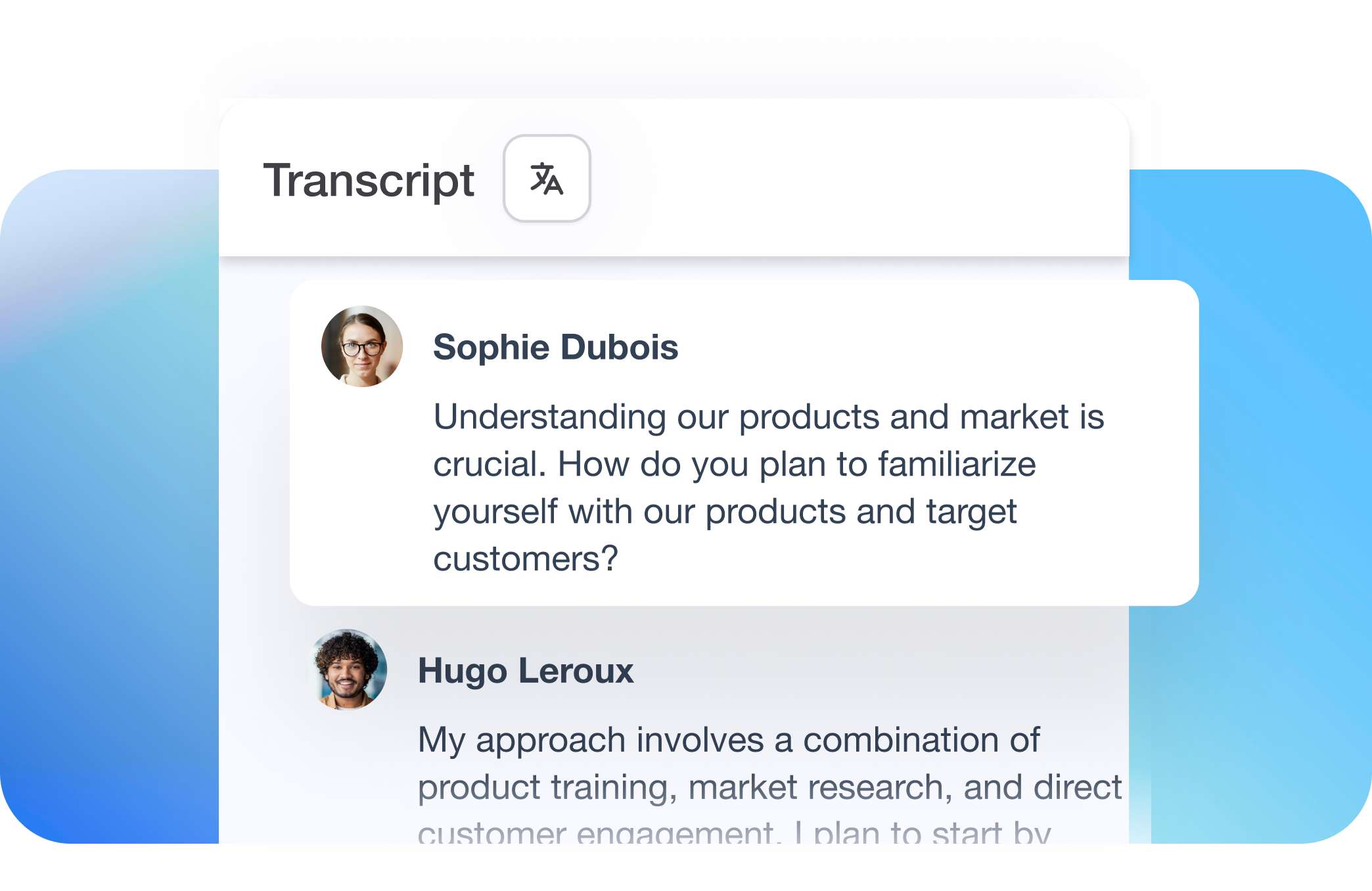
Imagine a tool that can automatically write and send personalized rejection emails to your candidates. That's what Noota enables you to do :
✅ Automated transcription and analysis
Right after you complete an interview, Noota transcribes the conversation and highlights key moments. This gives the AI not just raw text, but insights into competencies, responses, and notable discussion points.
✅ Context-aware email drafting
Noota’s AI Email Assistant drafts rejection emails using data like interview highlights, skills discussed, and your employer context, so each message feels tailored rather than templated. It can draft messages directly in Gmail or Outlook, incorporating your company’s tone.
✅ Customizable templates tied to real content
While you can still use basic templates, Noota lets you embed them in workflows that automatically pull interview specifics — names, strengths discussed, and other personalized details — into your rejection emails.
You want to send rejection emails that are respectful, personalized, and timely for each interviewee ? Try Noota for free.
FAQ
❓ Q: Should I always send a rejection email?
Yes — you should send one every time. Silence leaves candidates unsure where they stand and can harm your reputation as an employer. A clear rejection email gives closure and signals respect for the candidate’s time and effort.
Prompt communication also helps you avoid being perceived as unresponsive or unprofessional — something many candidates discuss on sites like Glassdoor and LinkedIn when companies “ghost” applicants.
❓ Q: When is the best time to send a rejection email?
Aim to send the rejection email as soon as your decision is final and your chosen candidate has accepted. Recruiter resources suggest this is ideally within 24–48 hours of the decision.
Any longer than that risks leaving candidates in limbo and creates a negative experience. Quick closure lets them move on with confidence and reflects well on your hiring process.
❓ Q: When should I call a candidate instead of emailing?
For candidates who made it far into the process — especially final-round or internal applicants — it’s often best to call first, then follow up with an email.
A real conversation shows extra respect for the time they invested. You can still send a written follow-up to document the outcome, but that initial call adds a human touch and improves candidate experience.
❓ Q: Should I include feedback in a rejection email?
It depends on the stage of the process and local regulations, but brief, role-focused feedback can be appreciated by candidates. For later-stage interviews, a short comment on a strength or an area for growth helps candidates learn and feel genuinely seen.
Keep feedback objective and tied to the role (e.g., “We were looking for more direct leadership experience”) rather than personal traits, which can avoid confusion or misinterpretation.
❓ Q: How personal should the email be?
Personalization matters. Even when using templates, include the candidate’s name, the specific role, and a line referencing their interview or strength. This shows you paid attention and didn’t just send a copy-paste message.
Generic messages feel impersonal and can harm the candidate’s perception of your brand. Personal touches, even small ones, go a long way.
❓ Q: What tone should I use in a rejection email?
Aim for a professional yet empathetic tone — polite, clear, and respectful. Avoid overly formal language that feels cold, or vague wording that leaves candidates guessing about their status.
Balance firmness (clarity about your decision) with warmth (appreciation for their time and effort). This combination protects your employer brand and helps candidates walk away with a positive impression.
❓ Q: Can I automate rejection emails at scale?
Yes — and many recruiters do this effectively. But automation shouldn’t mean impersonal communication. Modern ATS systems can send automated, yet personalized emails that pull in candidate names, roles, and interview details.
Templates are a great foundation, but always review automated messages, especially for mid- and late-stage candidates, to ensure they feel human.
❓ Q: How do I handle internal candidate rejections?
Internal rejections require extra care. Since internal applicants have existing relationships within your company, your message should be more detailed, appreciative, and transparent than for external candidates.
Acknowledge their courage in applying, reaffirm their value to the company, and, where appropriate, offer feedback or development guidance. This helps maintain morale and trust.
❓ Q: What common mistakes should I avoid?
Here are pitfalls to watch for:
- ❌ Waiting too long to send the email
- ❌ Using cold, generic language
- ❌ Avoiding all feedback even when appropriate
- ❌ Failing to personalize the candidate’s name or role
Leverage your Interview Data
AI interview notes, scorecard, follow-up, ATS integration, and more...

Jean-marc is an AI expert helping recruiters & professionnals leverage these tools in their everyday work.
Related articles
.webp)

.png)

Forget note-taking and
try Noota now
FAQ
In the first case, you can directly activate recording as soon as you join a videoconference.
In the second case, you can add a bot to your videoconference, which will record everything.
Noota also enables you to translate your files into over 30 languages.
.svg)